
Free open-source packages. Studio plans for teams.
Start free with the MIT packages. Add Studio when content becomes a team workflow, then choose Starter, Pro, or Enterprise by seats, usage, delivery, and deployment needs.
Open Source
$0 MIT packages
MCP, CLI, SDK, types, rules, and skills. No account needed.
Install CLI- Local-first workflows
- Normalize hardcoded strings
- Generated SDK
- Local review UI
Starter
$9 per month
For solo developers and small projects using Studio.
Start trial- 3 seats
- 300 AI credits/month
- Studio-hosted AI key
- CDN delivery
Pro
$49 per month
For teams that need collaboration and higher limits.
Start trial- 25 seats
- 1,600 AI credits/month
- Bring your own AI key (BYOA)
- Conversation API access
Enterprise
Custom cloud or self-managed
For organizations needing dedicated support, SSO paths, white-label, and custom limits.
Talk to sales- Unlimited seats and custom limits
- Enterprise self-managed licensing
- SSO and white-label roadmap
- Dedicated support
Usage limits and overages
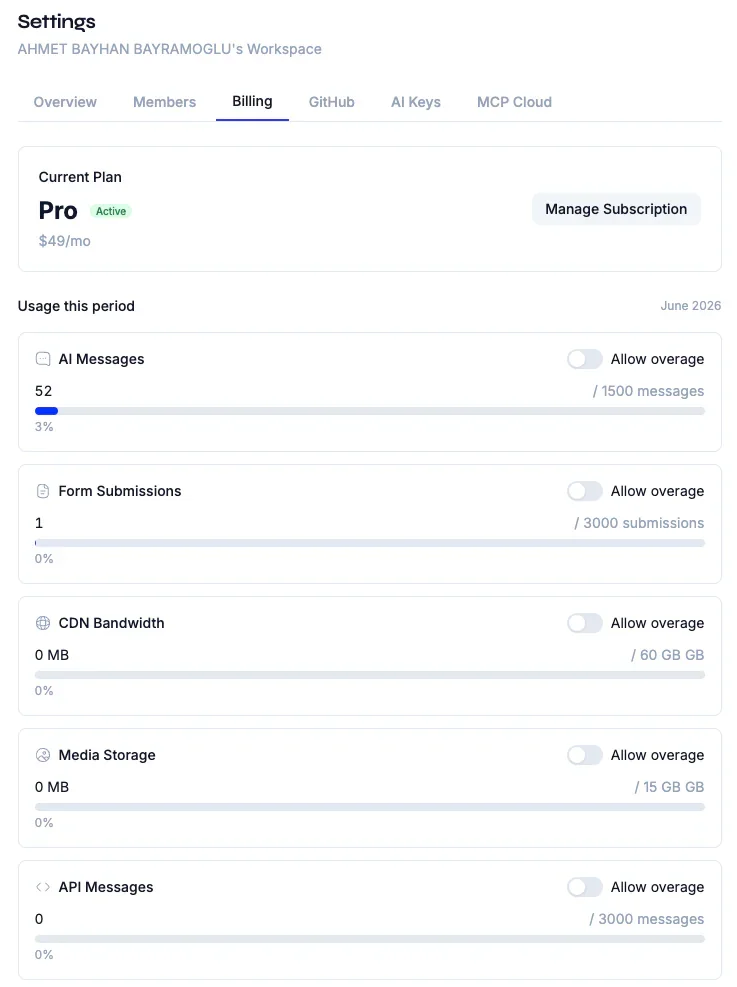
Each paid Studio plan includes a monthly allowance for metered usage. Turn on overages in Studio to keep working past your plan's limits — otherwise usage stops at your plan's limit.
| Metered usage | Starter | Pro | Enterprise | Beyond your plan |
|---|---|---|---|---|
| AI credits | 300 / mo | 1,600 / mo | Unlimited | $0.025 / credit |
| API credits (Conversation API) | Not included | 450 / mo | Unlimited | $0.025 / credit |
| MCP Cloud calls | 5,000 / mo | 150,000 / mo | Unlimited | $0.001 each |
| Form submissions | 100 / mo | 3,000 / mo | Unlimited | $0.01 each |
| CDN bandwidth | 3 GB | 60 GB | Unlimited | $0.15 / GB of origin transfer |
| Media storage | 5 GB | 25 GB | 100 GB | $0.25 / GB-month |
Overage pricing is per unit, in USD, and requires an active paid subscription. One AI or API credit is $0.01 of model cost. CDN bandwidth counts only transfer from Studio's origin; cache hits and unchanged (304) responses are free. Media storage is billed on the average stored over the billing period. Overage on CDN bandwidth and media storage stops at 10× the plan's allowance. Without overage, CDN delivery pauses at 120% of the allowance until the month resets, and new uploads stop at the storage limit. Seats are fixed per plan (Starter 3, Pro 25; Enterprise is custom). The open-source packages have no usage limits.
Open source
Build locally with the MIT packages
Initialize projects, normalize hardcoded strings, validate structured content, generate query access, and run local agent workflows before choosing a Studio plan.
- CLI, MCP, SDK, rules, skills, and types packages
- Local-first workflows for individual developers
- A direct path from hardcoded strings to governed content
Open source
MIT MCP, CLI, SDK, rules, and skills. No account required.
Studio
Add Studio when content becomes a team workflow
Studio becomes useful when editors, reviewers, and developers share responsibility for content. Workspaces, roles, structured views, chat-assisted operations, and Git-backed review give that team a common operating surface.
- Workspace and project operations
- Content editor and reviewer workflows
- Branch health, diff review, and merge controls
Pro
Team collaboration, higher limits, BYOA, and the Conversation API.
Usage
Plans scale with AI, API, forms, media, and CDN usage
Paid plans include monthly allowances for AI credits, MCP calls, API credits, form submissions, CDN bandwidth, and media storage. Features and meters only apply where the plan and deployment expose the corresponding capability.
- Starter: 300 AI credits and 5,000 MCP calls per month
- Pro: 1,600 AI credits and 150,000 MCP calls per month
- API, forms, CDN, and media allowances vary by plan
Enterprise
Enterprise licensing is for controlled infrastructure
Enterprise is the custom path for organizations that need controlled deployment, tailored limits, SSO, white-label options, support, or separately licensed capabilities. Exact infrastructure and feature requirements should be confirmed during evaluation.
- Self-managed Studio deployment
- Enterprise bridge and license checks
- Support for infrastructure-sensitive teams
Enterprise
Dedicated support, SSO, white-label, and custom infrastructure.
Plan selection
Choose by workflow and usage, not by feature guesswork
Start with the local packages, add Studio when people need a shared workflow, and compare plans using seats, included usage, required capabilities, and deployment constraints.
- Local developer workflow through the MIT packages
- Team workflow through Starter or Pro
- Custom deployment and limits through Enterprise
$ npx contentrain init
✓ Detected stack: nuxt
✓ Created .contentrain/
✓ MCP server configured for your IDE
→ Git is now your content source of truth
# next: contentrain scan ./src
Common questions
Can we start without paying?
Yes. The MIT CLI, MCP, query SDK, rules, skills, and types packages support local development without a Studio subscription.
How do we choose a Studio plan?
Starter is $9 per month with 3 seats and lower included usage. Pro is $49 per month with 25 seats, higher limits, and advanced operations. Enterprise uses custom limits, deployment terms, and support.
Are all Studio features available on every plan?
No. Features such as media, CDN delivery, forms, webhooks, Conversation API, remote MCP, SSO, and model-scoped roles depend on plan, edition, provider, and deployment configuration.
Next paths
Continue through the content system
Start local. Scale to Studio.
Build a governed content layer before content becomes product debt.
Start locally with the MIT packages. Add Studio when teams need review, roles, structured editing, managed delivery, or deployment control.